Table of contents
Key takeaways:
- If you’re looking for free podcast software, Audacity, GarageBand, and Adobe Podcast Studio are all solid options.
- If you’re just starting out and want a simple software with an intuitive interface, Adobe Podcast, Riverside, and StreamYard are all beginner-friendly.
- If audio quality is your top priority, Audacity, Cleanfeed, and Reaper are the best choices.
- If you want a streamlined, all-in-one platform for recording, editing, and hosting, choose Riverside or Zencastr.
I’m Stephen Robles, a YouTube content creator with more than 210,000 followers. I’m also the host of Primary Technology, a tech podcast that consistently ranks in the top 100.
One thing I’ve learned: The recording software you choose can make or break your podcast.
In this guide, I’ve tested 9 popular podcast software and explained each one’s pros and cons.
Our goal? To help you choose the best podcasting software for your specific needs.
Let’s go!
Podcast recording tools comparison
Here is my quick recap of the best podcast recording software to help you decide:
- If you want an all-in-one podcast platform, from recording to editing and hosting: Choose Riverside.
- If you want to record remote interviews: Pick Riverside or Zencastr.
- If you need a free option and don't care about video: Download Audacity.
- If you are Apple-only and just starting out: Stick with GarageBand.
- If you want seamless editing: Go with Squadcast and Descript.
- If you need the absolute cleanest remote audio routing: Use Cleanfeed.
- If you want an affordable, professional DAW: Invest in Reaper.
- If you live stream while you record: StreamYard is a solid option.
- If you prefer simple, AI-powered browser recording: Try Adobe Podcast.
How I tested these tools
I have recorded more than 15,000 hours of podcasts and videos, attracting millions of listens on YouTube, Spotify, and Apple Podcasts. And I have tested more than 100 tools in the process.
To give you an honest comparison, I recorded the exact same 15-minute remote conversation across every platform on this list.
Then I downloaded the uncompressed WAV files to compare the raw audio quality side by side. I also tried every editing feature to check how well they actually streamline post-production.
During my hands-on tests, I evaluated each software against 6 criteria:
- Audio quality output: Does it capture studio-grade sound?
- Recording reliability: Does it protect your recording quality and files from unstable internet connections or tech issues?
- Editing workflow: Is it easy and quick to turn your recording into a polished episode?
- Ease of use: Is software intuitive to use for yourself and guests with no technical background?
- Pricing value: Is the price justified for the features offered?
- AI features: Is there automation that makes time-consuming tasks take minutes?
The top podcast recording software
If you want to build a reliable studio setup, looking at what the podcaster community uses is the best place to start. Here are the tools podcasters use most often.
Audacity

Why I like it: Unlike most free podcast software, Audacity comes with a full suite of advanced tools.
Price: Free
Compatibility: macOS, Windows, and Linux
Audacity is free, open-source, and gives you multi-track recording in up to 192kHz/32-bit as long as your hardware supports this resolution.
Audacity’s editor is very complete, and includes EQ, dynamics, noise repair, reverb, modulation, and more. You can also install many plugins to extend the workflow as your production needs grow.
Muse Group is constantly updating the software, and recently introduced important quality-of-life improvements like non-destructive editing. I also highly recommend checking out Muse Hub, their integrated repository of free effects (VST3) and royalty-free loops.
While powerful, Audacity’s interface feels outdated, and its learning curve is quite steep, especially compared with newer browser-based tools. It lacks support for remote recording, livestreaming, video capture, and automated post-production. To appreciate it, you must be comfortable recording locally and editing manually.
Key features:
- High-quality audio: Record in up to 192 kHz sample rate and 32-bit float depth.
- Recording timer and sound-activated recording: Schedule recordings or start recording when a sound is detected.
- Extensive editing tools: Enjoy all the basic editing tools you’d expect, plus more advanced options like split, duplicate, join tracks, and move segments.
- Audio effects: Access many built-in effects and get even more with third-party plugins.
Riverside
.webp)
Why I like it: You get everything you need to record, edit, host, and distribute a podcast, plus many features to make all of that even easier.
Price: Free plan available. Paid subscriptions start at $24/month.
Compatibility: Browser-based for macOS and Windows devices, plus a recording app for Mac and a mobile podcasting app for iOS and Android.
If you want to stop bouncing between different tools, Riverside is an all-in-one podcast recording, streaming, editing, and hosting software.
The software offers an intuitive UI and is easy to use. But it still provides everything beginner and professional podcasters need to create a high-quality show.
You can record up to 4K video and 48kHz audio locally, so slow internet connection won’t ruin your recording resolution. You can also livestream your podcast with up to 9 remote guests and get separate audio and video tracks for each.
The AI editor lets you automate editing while still keeping full control. You can create full episodes or ask for edits just by prompting the chat-based editor, Co-Creator. There’s also an array of automated editing tools to remove filler words, clean up audio, and trim your podcast using your transcript. But unlike most other AI editors, you still have a traditional video editing timeline and a parametric equalizer for more precise edits.
It also handles translations, captions, branding, and has dynamic layouts which automatically switch the focus to whoever is speaking.
Co-creator is also particularly strong for repurposing your podcast. You can ask it to turn episodes into blogs, social posts, shareable video clips, and more. And, you can automatically generate show notes, a cover, and transcript ready to publish with each episode.
Key features:
- Studio-quality video and audio: MP4 video recordings at up to 4K resolution; WAV or MP3 audio recordings at up to 16-bit depth and 48kHz.
- Remote recording: Host up to 10 participants in one recording and enjoy up to 1,000 audience members.
- Live streaming and live call-ins: Live stream to all major social media platforms and engage with your podcast audience in real time.
- AI features: AI-generated transcripts, podcast show notes, automatic captions, social media-ready short video clips, edit by chatting with Co-Creator, and AI text-to-speech to fill in missing audio.
- Built-in teleprompter: Easily keep track of a script while recording.
- Podcast hosting: Host unlimited episodes of a single show, then one-click distribute it to all major podcasting directories.
Best free podcast recording software
Here are some great podcast recording software options that’ll allow you to start a podcast for free.
Adobe Podcast Studio
Why I like it: Fast, easy, and efficient browser-based tool with zero friction.
Price: Free. You can get extra features and longer recordings for $9.99/month.
Compatibility: Browser-based in Google Chrome on desktop.
I consider Adobe Podcast Studio the best free podcast recording software for beginners looking for a browser-based tool with zero setup. It’s a relatively new entry in the free recording space, but it’s gaining traction.
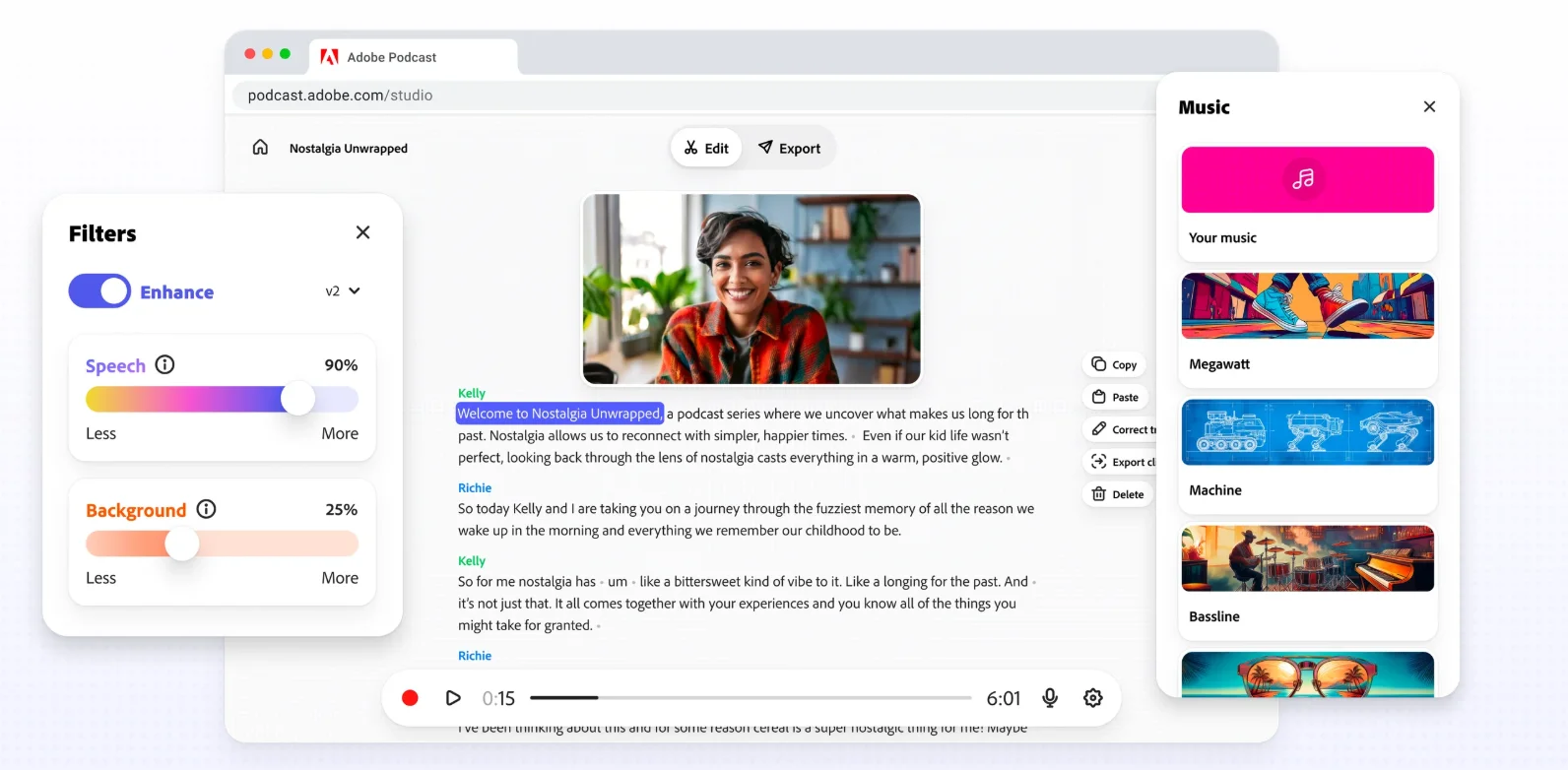
Adobe Podcast’s free plan is one of the most complete you can find, with high-quality recording and fast AI-powered post-processing. You can capture each speaker as a separate 16-bit, 48 kHz WAV track, even when someone’s internet connection is unstable.
Its flagship feature, “Enhance Speech,” is genuinely impressive. It uses AI to strip away background noise and echo, making a standard laptop mic sound remarkably close to a treated studio setup. The Premium version is even more powerful, letting you independently adjust speech, background noise, and even music on separate layers.
The catch is the limited editing depth and the constraints of the free plan. Unless you upgrade to Premium, Enhance Speech is limited to audio files up to 30 minutes, with one hour of processing per day.
Key features:
- Recording quality: WAV or MP3 audio in 16-bit, 48 kHz quality with separate tracks.
- Enhance Speech: Automatically reduce background noise and echo with a click. You can also adjust and rebalance music on the paid plan.
- Browser-based platform: No download required. Just log in and start recording and editing.
- Remote recording: Invite up to 5 guests by sharing a simple link.
GarageBand

Why I like it: It’s built-in guided learning and tutorials make it really easy for anyone to get into.
Price: Free
Compatibility: macOS and iOS only
GarageBand remains one of the best entry points for new podcasters who don’t want to invest in paid podcasting software. It’s Apple’s freeware for audio editing and recording and while it’s primarily built for music production, it works well for podcasting.
Apple designed this software with a highly visual, beginner-friendly interface with simple-to-use recording and editing tools. You can make your own podcasting templates and equalize or compress your audio easily. I use its built-in sound library full of royalty-free jingles, instruments, loops, and sound effects to make some intros and transitions. There’s also an iPhone and iPad app available that works as a mobile recording studio with up to 32 tracks and touch-based editing.
GarageBand limits are clear, though. Besides working only on Apple devices, it doesn’t support video, and it has no support for remote recording.
Key features:
- Quality sound: Record in standard 44.1 kHz sample rate/16-bit depth.
- Multitrack recording: Record each participant in separate tracks for better post-production editing.
- Basic editing tools: Cut, copy, paste, trim, and split. Set up automations for volume, panning, and effects.
- Integration with Apple products: Plays nice with other software like Logic Pro and Final Cut Pro.
- iOS app: Works on iOS devices so you can record on the go.
Best remote podcast recording software
If you’re into interview-style podcasts with remote guests, you have some specific needs. Here are my top picks for remote recording.
Cleanfeed
Why I like it: Captures audio in broadcast quality without any unnecessary bloat.
Price: Free plan available. Paid plans start at $36 per month.
Compatibility: Windows, maOS, Linux, Android. Compatibility is browser-based, so check to ensure your browser is supported.
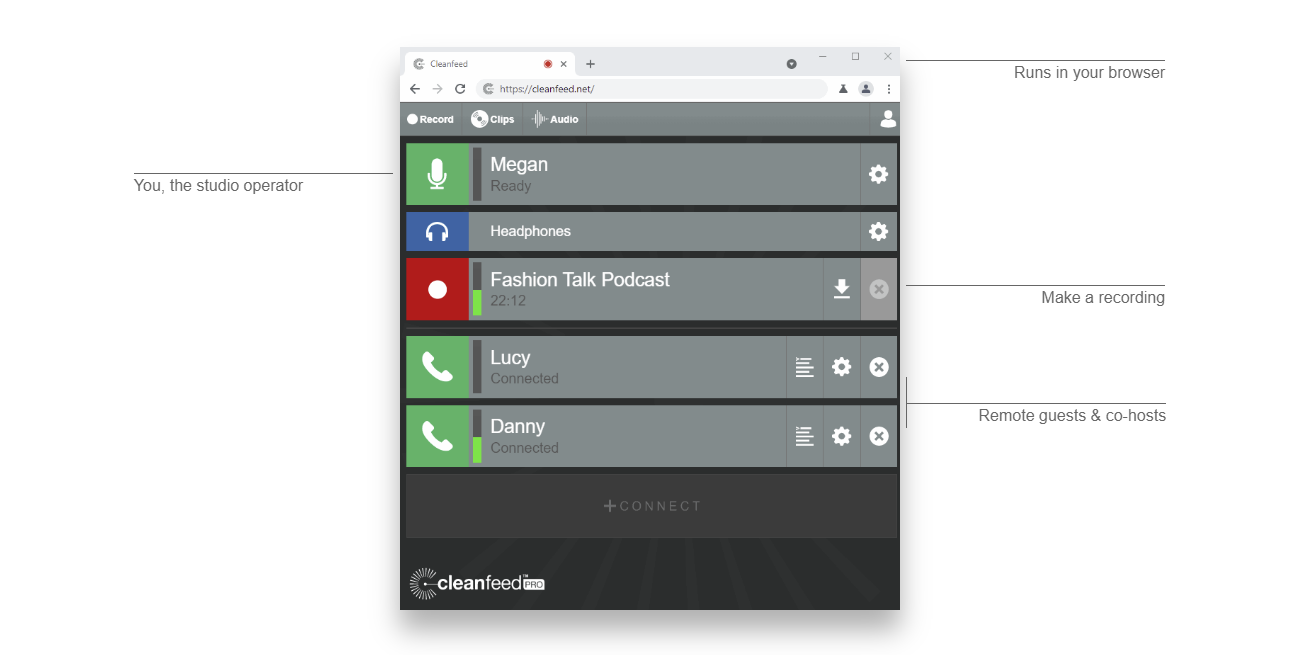
Cleanfeed is a web-based platform that is best at capturing uncompressed, exceptionally clean remote audio. It’s built for live broadcasting, which is why it’s used by professional media teams and broadcasters like BBC and NPR.
It offers multitrack recordings for an unlimited number of remote guests. It also provides advanced recording options for mixing multiple hardware sources simultaneously, or routing tracks live into other software. The automatic audio cleaning feature allows you to record clean audio even in the harshest, most noisy environment.
Despite its advanced features, Cleanfeed is still a very simple platform, which makes it a solid choice for beginners. Just remember that it’s audio-only, so it won't scale with you if you move into video podcasting.
You also won’t find audio editing capabilities here. Users need to export audio files to separate software to finalize your recordings.
Key features:
- High-quality audio: Preserve original sound quality with 16-bit depth and 48 kHz sample rate.
- Multi-track recording: Capture each participant’s audio on separate tracks for better post-production editing and control.
- Live audio monitoring: Hear the quality of your recordings in real-time to ensure consistent audio levels and quality.
- Remote recording: Connect with guests from different locations easily and seamlessly.
- Live broadcasting: Stream sessions to a live audience on the Cleanfeed platform.
SquadCast + Descript
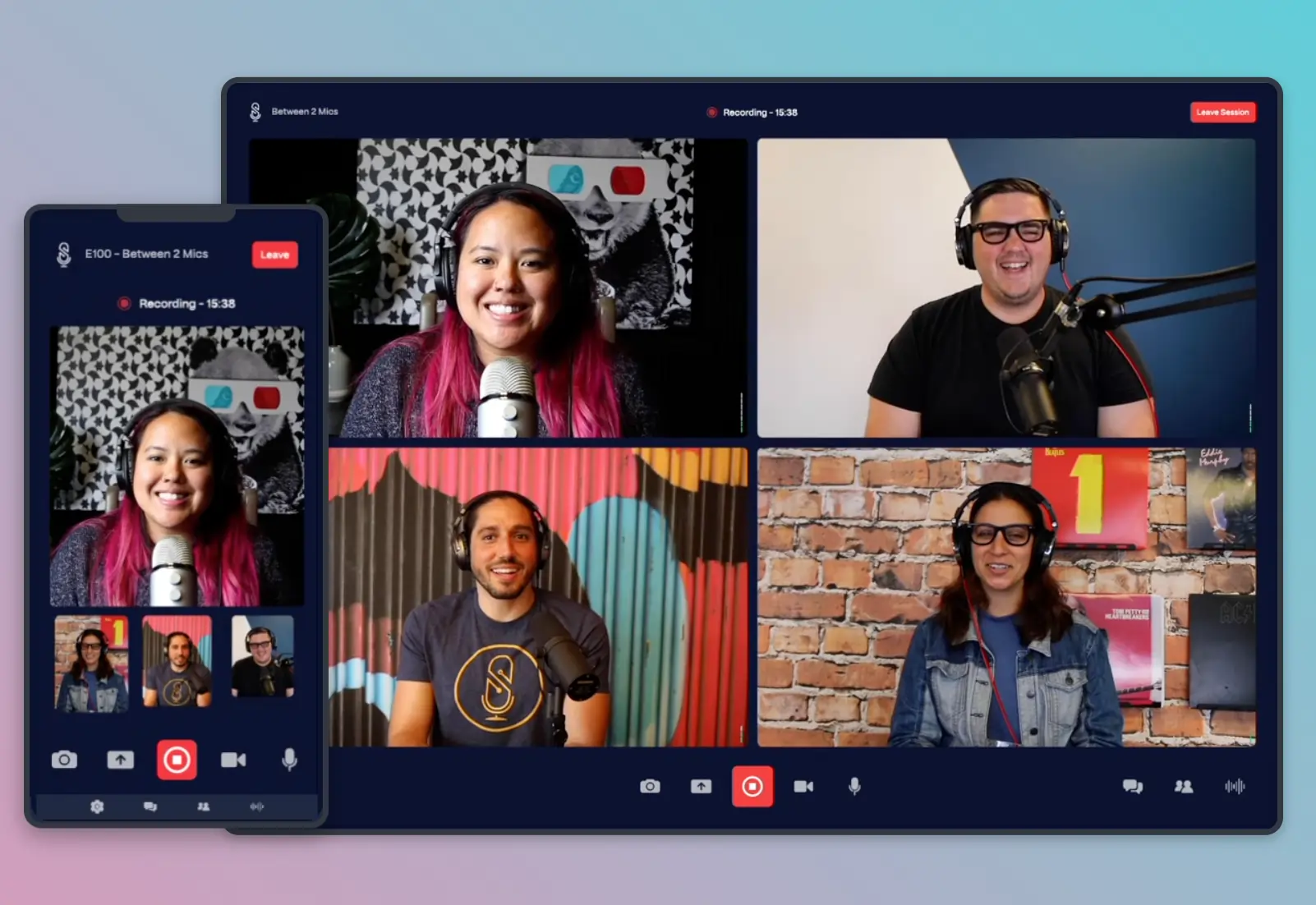
Why I like it: Their integration between SquadCast and Descript comes with many time-saving AI features.
Price: Free plan available (for SquadCast only). Paid plans start at $16 per month.
Compatibility: macOS, Windows, iOS (Beta), Linux.
SquadCast was primarily a podcast recording platform. Over time, instead of evolving into one of the many Descript alternatives, they integrated it and they now include a full editing suite.
You can record in up to 4K resolution with up to 10 live participants in SquadCast. Interestingly enough, this software uses a unique Dolby Voice integration that makes your remote guests sound like you’re sonically in the same room with you. It also surgically removes background noise and reduces harsh consonant sounds for a very smooth finish.
The Descript integration is a bit clunky since it forces you to move from a platform to another. However, you’ll get access to efficient AI editing tools, including filler word removal, clip creation, text-based editing, and a green screen. Just like recording, you have a cap on editing hours, though.
Note that you can also use Descript Rooms for recording to avoid swapping tools, but compared to Squadcast it is a bit lackluster. There are no advanced guest scheduling features and team roles and permissions are available only on Business plans.
Overall, Squadcast and Descript offer an end-to-end podcast workflow with worthwhile integrations, even if it’s not the smoothest experience.
Key features:
- Separate track recording: Record up to 10 participant’s audio and video on individual tracks.
- Dolby integration: Improve your audio quality with dynamic audio leveling, noise canceling, and echo cancellation.
- Descript integration: Access Descript’s AI tools for editing, transcriptions, captions, and clip creation.
- API and Zapier integration: Create automations to streamline your workflow.
- Backstage participants: Invite up to 10 behind-the-scenes guests.
- Easy scheduling: Sync your account to your calendar, including Apple, Google, and Outlook.
Read more: Check our full Riverside vs SquadCast guide to learn which platform fits your workflow better.
Zencastr
.webp)
Why I like it: Good features for hosting and monetizing multiple shows.
Price: Free plan available. Paid plans start at $24/month.
Compatibility: Windows and macOS devices, plus an iOS app for iPads and iPhones.
Zencastr’s podcast software includes recording, editing, hosting, and monetization.
You can record in high-quality with up to 11 remote guests on both desktop and mobile. Post-production supports all the features of a modern AI editor, such as text-based editing, sound cleaning, clip generator, pause removal, and active speaker identification. You can customize your recording by adding logos and custom backgrounds.
Still, its editing features feel somewhat limited, and a bit rough around the edges. You may end up adding the last touches on a more mature editor like Premiere Pro.
Zencastr also provides hosting and monetization of your show. You can host up to 6 shows and share your episodes on any website with embeddable players. You also get access to a Creator Network where you can find sponsors and partners, and earn with dynamic or programmatic ad insertion.
The biggest trade-off is the pricing model. Paid plans severely limit your editing capabilities, capping, for example, the maximum number of filler words you can remove or the clips you can generate.
Key features
- Remote podcast recording: Get up to 4K video (depending on your plan) and 48 kHz/16-bit audio.
- Local, multitrack recording: Get quality audio in separate tracks despite internet connection quality.
- Podcast hosting and distribution: Upload up to 6 shows and distribute your episodes to all podcast platforms.
- Analytics: View analytics for multiple shows within the platform and connect to Google Analytics.
- Audio enhancements: Reduce background noise, normalize audio, and more.
- Storage integration: Save content to Google Drive and Dropbox.
Best podcast recording software for solo podcasters
If you’re a solo podcaster, you can use any of the software in the previous list. But if you don’t ever intend to have remote guests, a dedicated Digital Audio Workstation (DAW) may be the best option.
Reaper

Why I like it: Advanced audio control and deep editing precision without a subscription.
Price: One-time licensing fee starting at $60.
Compatibility: macOS, Windows, and Linux
Reaper is the best option if you want a professional recording software at a one-time price, with no subscription and no feature limits.
It’s a full digital audio workstation, so you can record high-quality content with multiple inputs. You also get professional multitrack editing, automation, routing, effects, and support for over 200 plugins without being locked into a subscription.
Reaper is very lightweight, running smoothly even on older computers, and it’s totally customizable. You can record and clean up a solo episode, or build a full post-production chain with custom macros and scripts to automate almost every task. It supports many plugin formats, which makes it far more expandable than most podcast editors.
While Reaper is a good audio recorder for podcasters, it comes with a steep learning curve. It can also become very complex to set up if you are looking to do more than record and edit audio like live streaming or remote recording.
Key features:
- Multi-track recording: Record separate tracks in up to 192 kHz and 64-bit float.
- Real-time monitoring: Hear yourself and other participants in real-time without delay.
- Comprehensive editing tools: Cut and trim, adjust timing and pitch, and apply smooth crossfades.
- Plugins and tools: Supports many plug-ins and tools to expand your audio processing options.
Best podcast recording software for live streaming
If you want to engage with an audience in real-time while simultaneously capturing the episode for later, you need a tool built specifically for this purpose. Here’s my favored pick:
StreamYard
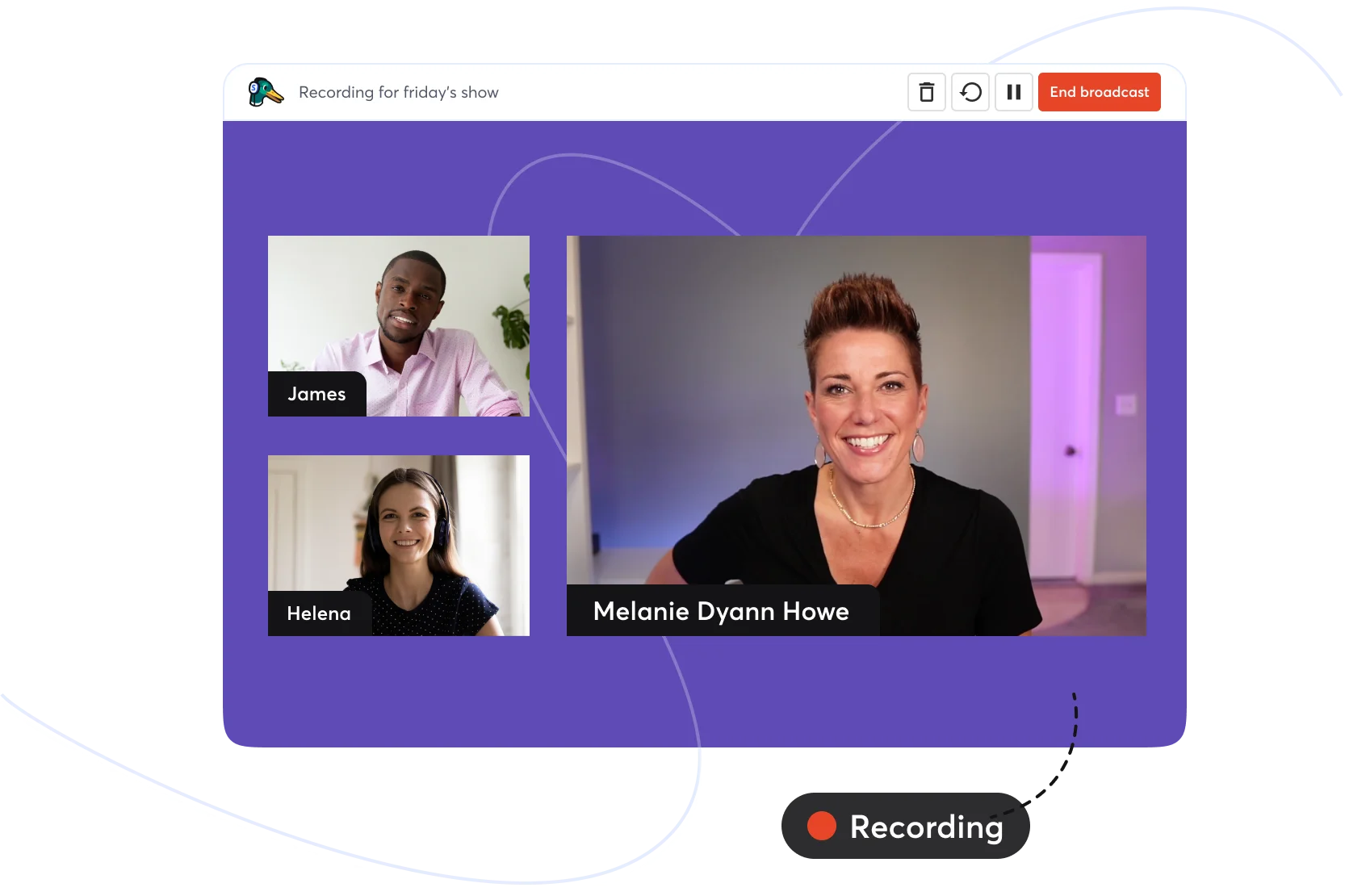
Why I like it: It's really simple to go live on multiple platforms at once without having to learn how to use OBS.
Price: Free plan available. Paid plans start at $35.99/month
Compatibility: macOS, Windows, and Linux
StreamYard is the best option if you want to stream your podcast live to multiple platforms while still capturing clean, separate tracks for editing.
The platform is entirely browser-based, making guest onboarding as simple as sending a link. You can stream your podcast live to multiple destinations simultaneously, pulling all audience comments into a single chat window.
StreamYard comes equipped with lots of features to keep your audience engaged during your live. Invite audience members on screen, highlight their messages, and even host contests and giveaways. Your studio is fully customizable, with plenty of branding options.
While live broadcast feeds are naturally compressed, StreamYard actually captures 48kHz WAV audio and up to 4K video locally for each participant. This means you can run a live show with no buffering but still walk away with pristine, separate tracks for your editor.
StreamYard offers basic AI clipping tools, but its post-production features are fairly limited with no text-based editing or timeline control available.
Key features:
- Multistreaming: Stream to multiple destinations and custom RTMP on paid plans.
- Local recordings: Save separate audio and video files for each participant in up to 4K video and 48kHz audio quality.
- Engagement tools: Unified live chat, live call-ins, on-screen audience comments, and customizable giveaways.
- Branding tools: Add overlays, logos, backgrounds, banners, and custom layouts.
- AI clips: Automatically generate short clips and reels from longer streams.
- Easy to use: Beginner-friendly interface and frictionless browser-based guest access.
FAQs about podcast recording software
What do you need to start a podcast recording?
To start podcasting you need a microphone, a camera for video podcasts, and recording software. If you want a more complete podcast equipment kit, this usually includes:
- An external USB or XLR microphone.
- Closed-back headphones for audio monitoring.
- A high-res camera for video.
- Recording software.
- Basic lighting.
- Additional accessories, such as a pop filter, audio mixer, mic stands, and more.
We’ve got a full guide on podcast equipment if you’d like to learn more.
What’s the best free podcast recording software?
The best free podcast recording software is Audacity for local audio recording and multi-track editing, and GarageBand for Apple users. The free version of Adobe Podcast is also surprisingly powerful yet easy to use for browser-based recording and AI cleanup.
What recording software do professional podcasters use?
Professional podcasters use remote recording platforms like Riverside or dedicated Digital Audio Workstations (DAWs) like Reaper and Audacity. Riverside captures studio-grade 4K video and separate audio tracks making it ideal for remote interviews. For heavy, localized audio post-production, solo professional podcasters sometimes prefer relying on the surgical precision of DAWs, instead.
Can I record a podcast with just my phone?
Yes, you can record a podcast with just your phone by using a podcast recording app like Riverside, GarageBand, and Zencastr. You can capture quick episodes while on the go, then edit and polish them using the respective software’s desktop editor.
What’s the difference between a DAW and podcast recording software?
The difference between a DAW and podcast recording software is their primary focus and complexity. A DAW, or digital audio workstation, is built for detailed audio recording, editing, mixing, and mastering. Podcast recording software is usually built to make podcast production easier, especially when recording remote guests, and it often integrates video recording.
For example, Reaper is a DAW: it gives you deep editing control and advanced routing. Riverside and Zencastr are podcast recording platforms since they focus on recording with multiple guests, and providing support for hosting and distributing your content.
What software is best for recording a podcast with a remote guest?
The best software for recording a podcast with a remote guest are Riverside, Cleanfeed, Zencastr, StreamYard, and Squadcast. They all use local recording to capture pristine, separate audio and 4K video tracks directly on each participant's device, and provide minimal friction for guests.


Record in studio quality without the studio. Transcribe, clip, and edit within seconds.


.webp)