

-(1).webp)


Key takeaways
- Podcast descriptions are often the first impression listeners have of your show.
- Your description affects how your show appears in search results and on listening platforms.
- A good description defines your podcast topic, what listeners gain from it, and what sets it apart.
- Besides a description, you’ll also need an episode summary and show notes for each episode. With Riverside, you can generate all of these automatically.
What is a podcast description?
A podcast description summarizes what your show is about (topic), who it’s for (audience), what they’ll get from listening (benefits), and what makes it different (USP).
People often confuse podcast descriptions, show notes, and episode summaries. They’re all important, but each serves a different purpose.
- Podcast description: A short overview of your show as a whole that appears on your main show page in podcast listening apps. It’s one of the first things listeners see when they browse your show. Your description helps new listeners decide whether to listen and subscribe.
- Podcast show notes: An overview of an individual podcast episode. These often include a summary, timestamps, guest bios, calls to action, links, and resources. Podcast show notes provide additional resources to support an episode, making it easier to follow along.
- Podcast episode summaries: Engaging teaser blurbs that introduce a single podcast episode and draw listeners in. On most podcast platforms, episode summaries appear as brief text snippets alongside each episode.
Where do I write my podcast description?
You write your podcast description inside your podcast hosting platform. Your host will ask for a description during setup.
Once saved, your hosting platform distributes it via your RSS feed to podcast listening apps, such as Apple Podcasts and Spotify. This is the description listeners see when browsing your show or scrolling through episodes.
For example, here is the Smartless podcast’s description as it appears on the show’s Spotify page:

You can change your podcast description at any time—simply log in to your host, go to your podcast settings, update the necessary field, and hit save/publish. Your podcast description will get updated on your host and across all connected podcast listening apps via the RSS feed.
Tip! If you’re using Riverside for hosting, you don’t even need to write up a description. Prompt your new chat-based agent, Co-creator, to create one for you based on your episode recordings. You can also generate AI show notes at the tap of a button.
Note that you can change your podcast description at any time. Log in to your host, open your podcast settings, edit the description field, and save. The updated description will automatically sync across all connected podcast apps through your RSS feed.
How to write a podcast description (step-by-step + examples)
Here's how to write a clear, effective description for your podcast.
Step 1: Understand the purpose of your podcast
Before writing your description, get clear on the following:
- Your podcast’s main topic (personal finance, true crime, comedy).
- The format of your podcast (interviews, storytelling, solo commentary).
- Your ideal listener (age, interests, needs).
- Why should they listen (what they’ll learn, problems you solve, entertainment value).
- What makes your podcast unique (your expertise, humor, background).
Step 2: Clarify your promise and hook
Open with a single sentence that explains what value your podcast offers listeners. A promise like this helps them decide immediately if the show piques their interest.
This sentence should stand on its own, as previews may omit some of your description.
For example, Heavyweight opens by setting an emotional expectation. It frames each episode around unresolved moments from the past, making the format and topic immediately clear.

Step 3: Name your audience
Next, clearly state who your show is for using your audience’s own language.
If your hook works, listeners want to know right away if the show is meant for them.
Using audience-specific language helps the right listeners find you in crowded podcast directories. This boosts subscriptions and long-term retention.
Crime Junkie does this well by directly naming true crime fans in its description. That single label positions the show before anyone even presses play.

Step 4: Explain value and topics
Clearly explain what your show delivers and connect it to why the listener should care. Give them a reason to try an episode.
Avoid vague phrases like “interesting conversations” or “deep dives” as they don’t help anyone decide.
Take This American Life, for example. It frames episodes as “stories of ordinary people” that unfold like “movies for radio.” In one sentence, you understand both:
- what you’ll hear (real stories)
- and how they will be delivered (narrative, emotional, polished).
That clarity sets expectations and makes it easier for a new listener to press play.

Step 5: Add proof and credibility signals
Give listeners a clear reason to trust the show. This matters even more when you’re offering advice, analysis, or expert opinions. One strong credibility signal is enough.
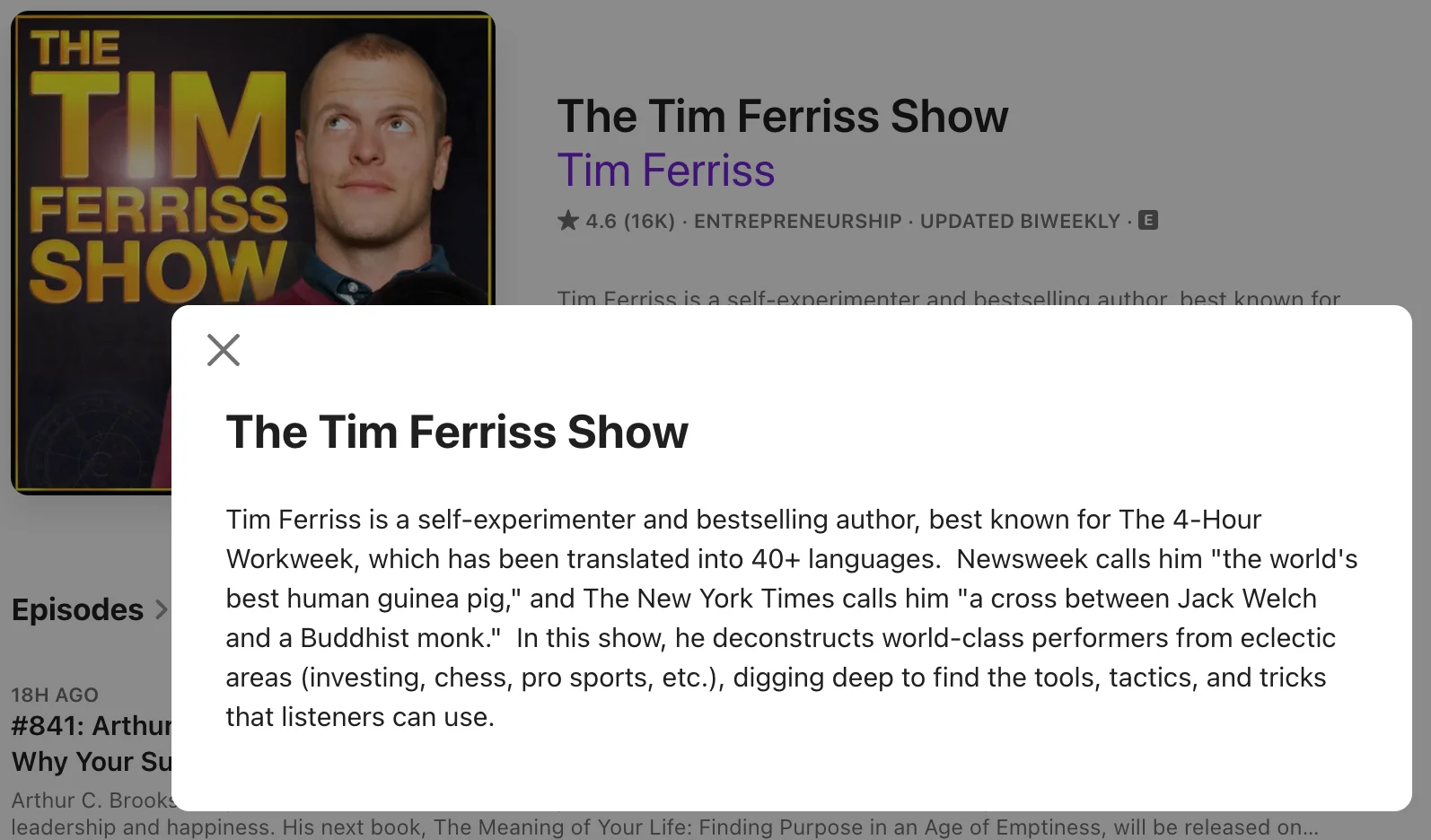
The Tim Ferriss Show does this by anchoring the show to Tim Ferriss’s background and the caliber of guests he brings on. World-class performers across different fields indicate the show is carefully curated, not a casual chat.
If your show is newer, credibility can come from lived experience, a specific problem you care deeply about, or a clear point of view you return to every episode.
Provide listeners with context for why your podcast exists and why you’re the right person to host it.
Step 6: Set expectations
Tell listeners exactly what they’re committing to. Spell out the format, how often episodes release, and what the show focuses on. This reduces drop-off after the first episode.
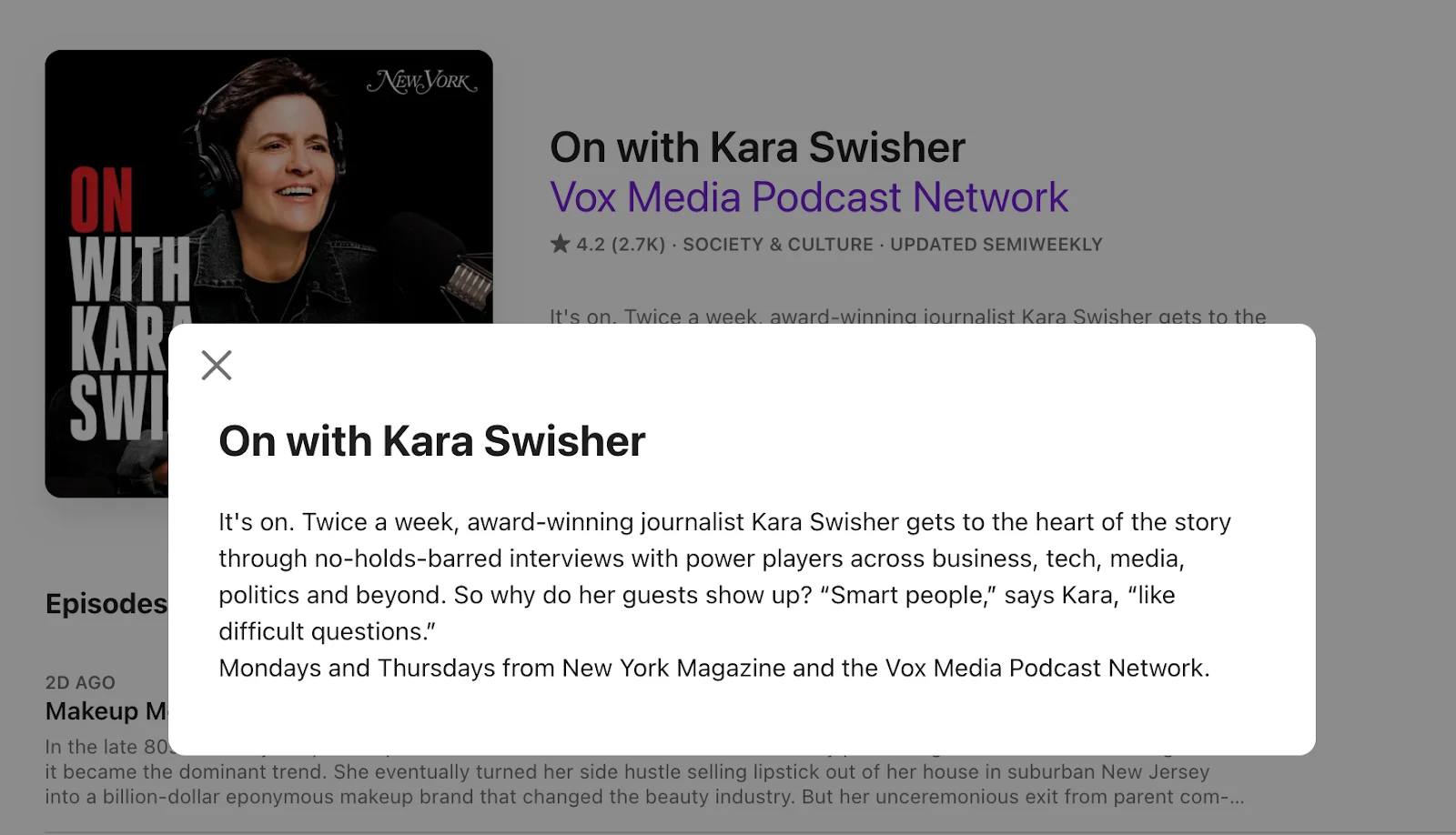
On with Kara Swisher is a strong example. It states:
- the format (interviews),
- the cadence (twice a week),
- and the subject matter (power, tech, politics).
Step 7: End with a clear CTA
Finish your description by giving the listener a single action to take. One clear next-step is easier to follow. When you stack multiple actions, listeners may hesitate or skip all of them.
The Daily is a good example. It asks listeners to subscribe and explains why the show fits into a daily routine by calling out episode length and release timing. You know what to do, and you know what you’re signing up for.
.webp)
If you include links, put the most important one near the top of the description. Podcast apps often truncate text, and anything buried at the bottom may never be seen.
Step 8: Optimize for search and previews
Before you publish, take a final review of your podcast description with discovery and search in mind. Focus on helping the right listeners understand your show at a glance.
Do a quick check:
- Use natural keywords in the opening lines (topic, audience, format).
- Keep sentences short and scannable.
- Read it out loud to catch awkward phrasing.
.webp)
How I Built This is a good example. Its opening lines include clear terms, like “entrepreneurs,” “founders,” and “brands.” And the description still reads like normal language, not a list of search keywords.
Review your description every few months. Update it when you shift main topics or start speaking to a different audience. Ensure the description matches what the listener hears when they press play today.
Podcast description templates with examples
Ready to start working on your podcast description? Hook your ideal listeners with the help of these compelling templates.
Template 1: Self-improvement podcast
Ideal for: Business and entrepreneurship, health and fitness, personal development podcasts.
[Podcast name] is the podcast for [target audience] who want to [achieve specific goal]. Join [host's name], a [host's credentials/experience], as they explore [main topics or themes] with a focus on [unique angle/approach]. Expect [format, e.g., in-depth discussions, practical advice, behind-the-scenes stories] and [what makes the podcast special, e.g., expert guests, exclusive content]. Tune in every [frequency] and start [call to action, e.g., your journey to, building your, unlocking your …].
Template 2: Storytelling podcast
Ideal for: True crime, personal stories, narrative-driven podcasts.
Step into a world of [intrigue/emotion/connection] with [host name(s)] as we uncover [main theme or subject]. From [specific example, e.g., "unsolved mysteries and shocking discoveries"] to [another example, e.g., "the hidden stories behind everyday lives"], we bring you compelling narratives that captivate and inspire.
Each week, we’ll take you on a journey through [key elements of the podcast, e.g., "twists and turns," "real-life accounts," or "deeply personal moments"]. Whether you’re here for the thrill, the empathy, or the unexpected, [podcast name] is your ticket to [emotional hook, e.g., "explore the extraordinary in the ordinary"].
Template 3: Informative podcasts
Ideal for: Educational, news and politics, documentary, technology, hobbies and interests podcasts.
Join [host name(s)] every [frequency, e.g., week, other week] as we delve into the world of [topic]. We'll explore [specific aspects of the topic, e.g., the latest breakthroughs, key historical events, current debates] with expert guests, insightful analysis, and engaging discussions.
Whether you're a seasoned [enthusiast of the topic] or just starting to learn, [podcast name] will keep you informed and engaged.
Download the podcast description templates above in a handy PDF.
Examples of great podcast descriptions
You don’t have to rigidly stick to the templates above. Use them as a guide, along with the examples below, for inspiration to help you craft the best possible podcast description.
Example 1: Modern Wisdom

Why this works: This description name-drops and humble-brags, and it works! Referencing famous people you’ve worked with demonstrates that they respect you and that your podcast offers a lot of value. It’s also clear that audiences will get a better ‘understanding of the world’ from listening.
How to improve: You could improve this description by making the intended audience clearer. It should also end with a strong call to action, such as checking out the trailer.
Example 2: Philosophize This!

Why this works: It’s clear who the target audience is in the first 2 sentences (beginners interested in philosophy). It also explains the podcast's value: you’ll learn about “the thinkers and ideas that forged the world we live in.”
How to improve: More info on the host(s) would help add integrity, and a clear call to action could direct people to the first episode.
Example 3: Swindled

Why this works: This description starts with a powerful hook. This isn’t just talking heads—this podcast is promising an immersive narrative experience. It tells listeners the types of stories they can expect and hints at why they matter (because they’ve “shaped our world in unimaginable ways.”) It also ends with a clear call to action.
How to improve: More information on the host(s) would help to entice listeners even more.
Why this works: This description starts with a powerful hook. It isn’t just talking heads; this podcast promises an immersive narrative experience. It tells listeners the types of stories they can expect and hints at why they matter (because they’ve “shaped our world in unimaginable ways.”) It also ends with a clear call to action.
How to improve: More information on the host(s) could entice listeners even more.
SEO for podcast descriptions
Podcast apps and search engines rely on the same inputs. Google indexes your show title, episode title, and description to list your podcast in relevant results.
These same elements also drive in-app search. Apple Podcasts confirms that search considers metadata alongside engagement. This means wording still matters, but it works in combination with listener behavior.
Write the first sentence like a search preview
Since descriptions can get truncated in lists, you should lead with the concrete identifiers people actually search for, such as:
- Guest name(s).
- Specific problem or angle.
- Niche or audience context.
Here's a simple pattern that works well: “<Guest name> on <specific problem> for <niche audience>.”
Map show keywords vs. Episode keywords
You want to rank for both browsing terms (‘short tail queries’) and specific (‘long tail’) queries. This helps ensure that audiences can find your podcast as a show and as its individual episodes.
- Show description: Broad themes people browse (e.g., true crime, founder interviews, personal finance).
- Episode description: Typically higher-intent phrases that indicate the listener is trying to solve an issue or learn something right now. For example, Series A fundraising terms, ADHD sleep routines, Nike brand strategy. Always include the guest's name and company here.
Podcast website SEO tips
Your podcast website also matters. It's where that interest turns into deeper engagement you can control and measure.
Use these tactics to make individual episodes discoverable in search and get clean attribution across Apple, Spotify, and YouTube.
Create episode pages on your website for search visibility
Publish each episode on your site with a short, indexable description that matches the first sentence on the listening apps. Mark up episode pages with structured data like PodcastEpisode so search engines can better understand the page content.
Add internal links with UTMs early
UTMs are short tags added to a link that tell your analytics tool where a visitor came from.
Podcast apps don’t always pass along clear referral data, so UTMs help you see whether traffic is coming from Apple Podcasts, Spotify, or YouTube—and which platforms are driving real engagement.
Place one main link near the top of each episode page and description. This keeps it visible before anything gets cut off.
Use this link to send listeners somewhere useful, like:
- The episode page with the full transcript, resources, and timestamps
- Your show hub, where people can browse the full catalog or start with recommended episodes
For example:
?utm_source=spotify&utm_medium=podcast&utm_campaign=episode_42
Why your podcast description matters
Let’s run through the top reasons why it’s important to get your podcast description right.
Bring in listeners
When people evaluate a new podcast, descriptions consistently rank above cover art and episode titles, according to a survey of 780 listeners. In other words, strong copy can matter more than your visuals.
Aid SEO and discovery
Podcast apps rely on text to understand what your show is about. Using the same words your audience searches for is basic podcast SEO and helps you show up in Apple Podcasts and Spotify results.
For example, a show like Beginner’s SEO Podcast includes phrases like “search engine optimization” and “SEO tips” because that’s how listeners actually search.

Pro Tip: Those same keywords should show up in episode summaries too, since discovery happens at the episode level, not just the show page. Riverside's automatic show notes do this for you!
Sets expectations
Setting expectations about your show helps you connect with the right audiences and filter out the wrong ones. That’s a good thing.
When people know what kind of content and format to expect, they’re less likely to bounce after an episode. Freakonomics Radio does this well by clearly mentioning the ideas, tone, and perspective you’ll hear each week.

Connect with your audience
Your description is your first introduction with a listener. You can speak directly to a problem they’re dealing with or show how your interests/passions align. Perhaps there’s a common joke or anecdote you can use from your industry.
That’s how shows like On Purpose with Jay Shetty (recorded on Riverside) create familiarity right away. The description feels personal and that makes people want to listen.

Build credibility
If your podcast is new, your description does some of the trust-building that reviews can’t do yet. A thoughtful, well-written description signals that you take the show seriously and know who it’s for.
Even without social proof, that effort goes a long way toward making your podcast feel like it’s worth someone’s time.
How to know if your podcast description is working
Use the following dimensions to understand if your podcast description updates are helping you achieve your goals.
Track conversion from views to plays
You want to know whether people who see your episode actually press play.
For instance, in Spotify for Creators, compare impressions (how often your episode is shown across places like Home, Library, and Search) with plays for the same episode. On Apple Podcasts Connect, use the closest equivalent: compare listeners and plays (and, if you want a quality check, engaged listeners).
When an episode gets plenty of impressions but few plays, the description usually isn’t doing its job. Descriptions that name the guest, topic, and audience early tend to convert more views into plays as listeners know what they are about to hear.
Check download changes after updating the description
Change the description on one episode, then watch downloads over the next 1 or 2 weeks.
Compare that performance with episodes published around the same time. When downloads rise and stay higher, the wording likely improved how the episode appears in search results or previews.
Monitor subscriber/follower growth
Follower growth shows whether listeners understand the show beyond a single episode.
Look at follower trends before and after you update the show description. When growth improves, the description likely clearly explains what the show offers and who it is for.
Review search discovery in analytics
In Spotify and Apple Podcasts analytics, you can see what share of listeners came from search. If that number is low, your description could be too vague. Clear topic phrases, guest names, and niche terms in the opening sentence make it easier for platforms to match your episode to what people are searching for.
Track clicks on external links
Clicks show whether listeners want to continue beyond the app. Add UTMs to the main link in your description and review traffic in analytics. Point that link to one clear destination, such as the episode page or show hub.
If clicks increase after a description update, it means listeners understand what they’ll get from the episode and are motivated to keep engaging. For instance, they might browse more episodes or check the resources.
Read more: For more on tracking your show’s success, look into our guides on podcast analytics.
FAQs about podcast descriptions
What is a show description vs. An episode description?
A show description explains what your podcast is about overall. It covers the core idea, the audience, and what listeners can expect from the show long term. This description remains largely unchanged and helps people decide whether to follow or subscribe.
An episode description focuses on one specific release. It explains what happens in that episode and why it’s worth listening to right now.
Together, they support both discovery and retention. The show description attracts the right listeners, while episode descriptions guide them to individual episodes.
How long should a podcast description be?
Technically, podcast platforms allow up to 4,000 characters for podcast descriptions, but these get cut off with a “read more” link after around 150 characters.
With this in mind, you can aim for a:
- Short version: 2 to 3 sentences work well if your show has a clear concept and audience. Focus on the promise, who it’s for, and what makes it worth listening to.
- Long version: Around 100 to 150 words gives you room to explain the format, topics, and expectations in more detail. This is useful for branded shows, educational podcasts, or shows with multiple segments.
No matter the length, write the opening as if it’s the only part people will see.
How do I write a description for a new podcast without social proof?
When you’re just starting your podcast, focus on clarity and positioning.
Lead with what the podcast is about. Be specific about who it’s for and what angle you’re bringing. If you have relevant experience, lived perspective, or a clear reason for making the show, include that context.
Avoid mentioning numbers or growth goals. Instead, describe the format, the topics you’ll cover, and what listeners can expect each episode. You can also invite early listeners to follow along and help shape the show. This helps set the right expectations and encourages engagement.
How often should I update my show description?
A good rule of thumb is to review your show description every quarter, or any time something meaningful changes.
Update it if:
- Your focus or audience shifts.
- Your release schedule changes.
- Your format evolves.
- Your performance dips and you want to test a stronger opening line.
It’s also a good idea to keep any sponsor mentions, season notes, or hiatus updates current so listeners aren’t confused.




.webp)


